0000313northp1000010
0000313northp2000300
0000313southp1000010
0000313west0p1000010
0000313east0p3000125
Here I have a sample data extracted form a sales system. The string includes the following data:
1…3 Initial zeroes
4…5 Month, time of sales
6…7 Day, time of sales
8…12 Region, if the region includes four digits, then 12th digit is zero.
13…14 Product
15…21 Sales quantity with initial zeroes, if needed
This data should be presented in human readable form.
With MID function we can extract certain number of characters from the string. Two functions make the data more readable, PROPER and NUMBERVALUE.
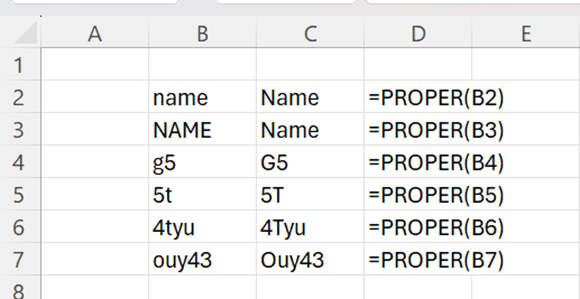
PROPER makes the first letter capital letter and remaining letters minor letters.
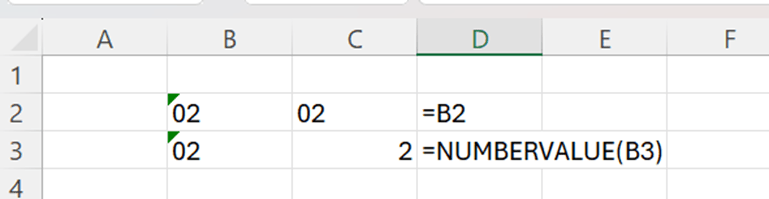
Cell category for B2 and B3 is TEXT. If I refer to B2, like I have done in C2, the cell category for C2 is TEXT. I cannot include those cells in any calculation. When I use NUMBERVALUE function, the result of the function is of cell category number and can be used in calculations.
Back to sample data, I have extracted here the data without PROPER and NUMBERVALUE.

The sentences are:
Month =MID(B2;4;2)
Day =MID(B2;6;2)
Region =IF(MID(B2;12;1)=”0″;MID(B2;8;4);MID(B2;8;5))
Product =MID(B2;13;2)
Amount =RIGHT(B2;6)
With region, the sentence has to check first whether the 12th digit is zero, meaning that region is spelled with four digits. Then only four digits are extracted starting from the 8th digit. If 12th digit is not zero, then five digits are extracted starting from the 8th digit.
The amount could be taken also with MID function, then the sentence would be =MID(B2;15;6).
The result is clear, but the numbers cannot be calculated, and it would look better if regions started with capital letter, and the product were written with capital P.
Now I have used PROPER and NUMBERVALUE functions, and you see the difference immediately.

Texts look better, and even more important, amounts are automatically in calculable format. Also, months and dates are in number category, if you want to calculate, for example, with functions MIN, MAX or AVERAGE.
Month =NUMBERVALUE(MID(B2;4;2))
Day =NUMBERVALUE((MID(B2;6;2)))
Region =PROPER(IF(MID(B2;12;1)=”0″;MID(B2;8;4);MID(B2;8;5)))
Product =PROPER(MID(B2;13;2))
Amount =NUMBERVALUE(RIGHT(B2;5))
Typically, PROPER and NUMBERVALUE are nested functions. First you are taking data with functions like MID, and when you have the result, you just frame it with PROPER or NUMBERVALUE. Also, these functions are not only for cosmetic reasons, but also to automatize the calculations.
 My Problem Solving Blog