Values in database are numeric like 1, 23, 587, 3, 56, 78.
When you are writing an SQL query you need to write values between apostrophes and values consist three digits, if the value is with one or two numbers, then initial zero or two zeroes are needed. Finally values are separated with commas and framed with brackets.
1, 23, 587, 3, 56, 78 are written (‘001′,’023′,’587′,’003′,’056′,’078’). You can do this manually. However, Excel can help you.
If length of the value is one, then at the start we need to add ’00 and after the value ‘. If the length of the value is two, then we need to add ‘0 before the value and ‘ after the value. In case value is three digits long, then only apostrophes are added ‘ before the value and ‘ after the value.
=IF(LEN(C4)=1;”’00″&C4&”‘”;IF(LEN(C4)=2;”‘0″&C4&”‘”;IF(LEN(C4)=3;”‘”&C4&”‘”)))

We do not yet have SQL line.

I added commas after the values apart from the last value. CONCAT formula is creating one string from several cells. CONCAT is merging cells even though the cells would not be in a line.
Only brackets are missing.
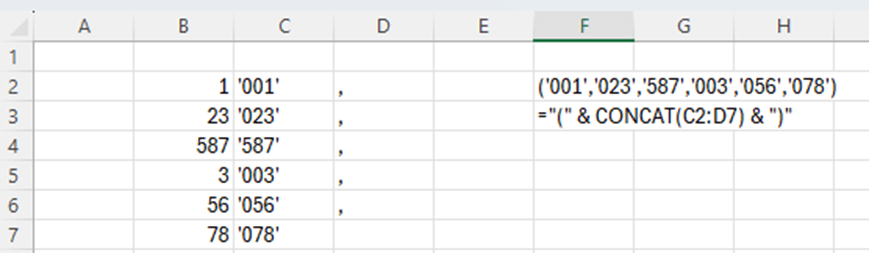
Now also brackets are in place.
We can write the query line. Copy the cell F2 into your SQL editor.
WHERE field1 IN (‘001′,’023′,’587′,’003′,’056′,’078’)
Writing the WHERE line manually is not a big deal, but if you have long list of values, then this blog might be useful. As said earlier, it is nice to have Excel in use, even though it would not be required.
 My Problem Solving Blog