You have an accounting report including account, debet/credit and balance. A part of accounts are with four digits, a part with five. We should calculate total debit and total credit for accounts with five digits.
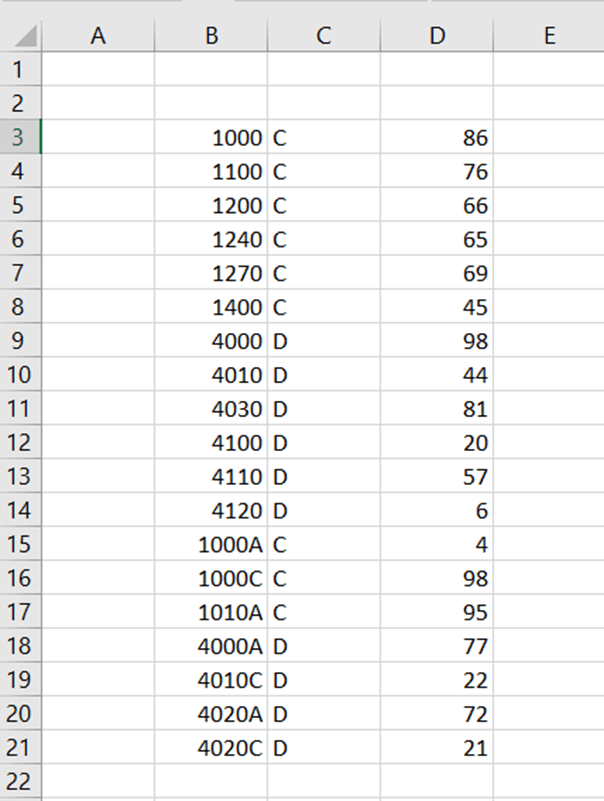
I tried with SUMIFS without success. Accounts with five digits are including letters, so the numeric condition would not work.

Luckily, SUMPRODUCT did not let us down.
The sentences are here:
=SUMPRODUCT((LEN(B3:B21)=5)*(C3:C21=G3)*D3:D21)
=SUMPRODUCT((LEN(B3:B21)=5)*(C3:C21=G4)*D3:D21)
First, we need to define that we are looking for values with five digits in column B. In column C, we are interested in values in G3 or in G4. After the sentence needs sum-column. Arguments are separated with multiplication sign.
The same data can be entered in MS Access.

The SQL query is:
SELECT data.dc, Sum(data.balance) AS SumOfbalance
FROM data
WHERE account LIKE ‘?????’
GROUP BY data.dc;
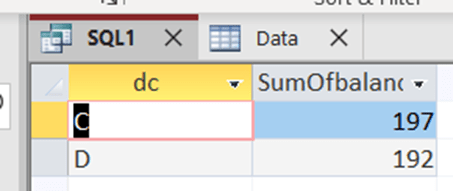
Access return the same results as Excel.
Five digits in MS Access SQL is ‘?????’, two apostrophes and five question marks inbetween.
Looks like SQL is easier than Excel in this case.
 My Problem Solving Blog