You have a sales report with sales value and a dimension. Normally, you calculate certain dimensions like a, b and c equals to something. Like how much is the total sales for dimensions a, b, and c.
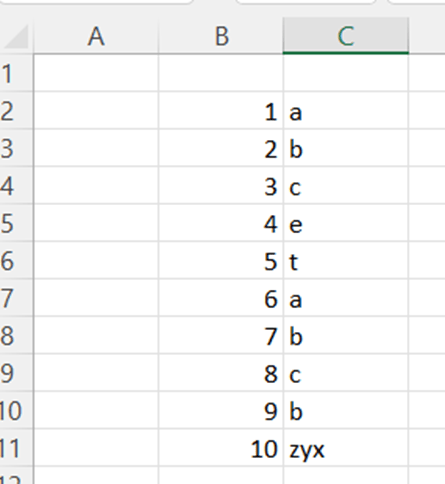
A, b, and c dimensions can be calculated with following sentence:
=SUMIF(C2:C11;”a”;B2:B11)+SUMIF(C2:C11;”b”;B2:B11)+SUMIF(C2:C11;”c”;B2:B11)
First SUMIF counts the totals for dimension a, second for b, and third one for c. After that all the SUMIFs are summed together. The formula returns the value 36.
If you need to exclude dimensions ? You should calculate other dimensions than a, b, and c. What is the sales volume for other dimensions than a, b, and c? One way is to calculate the total and then minus the sentence above.
=SUM(B2:B11)-(SUMIF(C2:C11;”a”;B2:B11)+SUMIF(C2:C11;”b”;B2:B11)+SUMIF(C2:C11;”c”;B2:B11))
Using SUMIFS function, you can use the sentence below.
=SUMIFS(B2:B11;C2:C11;”<>a”;C2:C11;”<>b”;C2:C11;”<>c”)
First you need to show the values in B2:B11, then dimensions C2:C11 and which dimension are we looking for not equal to a, not equal to b, and not equal to c.
Another way to calculate other dimensions than a, b and c:
=SUMPRODUCT((B2:B11)*(C2:C11<>”a”)*(C2:C11<>”b”)*(C2:C11<>”c”))
The logic with arguments is somewhat similar to SUMIFS. First, you need to show values B2:B11 and then dimensions and which dimensions are excluded.
For me, both SUMIFS and SUMPRODUCT are simpler than SUM/SUMIF.
 My Problem Solving Blog