I have introduced INDEX earlier, here is one application how to use INDEX.
Sometimes it nice to calculate manually and check that Excel formula works correctly.
Let’s take matrix calculation with MMULT.
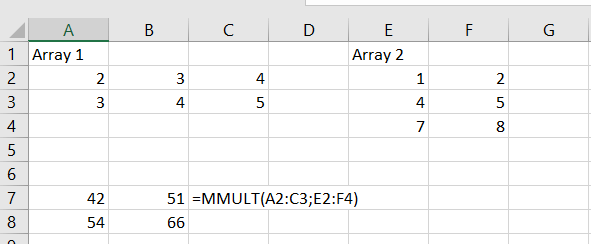
We have two arrays, one in A2:C3 and two in E2:F4.
Write the formula in A7 =MMULT(A2:C3;E2:F4) and press enter.
However, if you want to calculate manually.

The formula in A7 is =A2*E2+B2*E3+C2*E4, in B7 =A2*F2+B2*F3+C2*F4, in A8 =A3*E2+B3*E3+C3*E4 and in B8 =A3*F2+B3*F3+C3*F4.
You can automate the manual process.
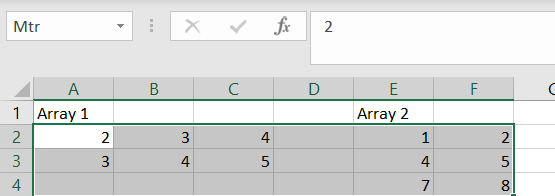
Activate the range B2:F4 and rename the range by replacing A2 in the small window. I wrote Mtr as the name for the range.
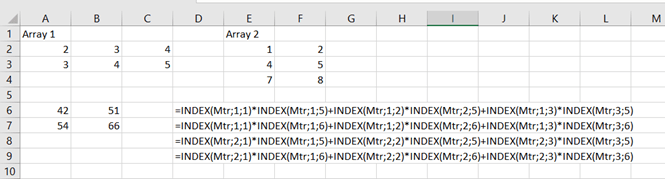
I have earlier written a blog text about INDEX. You define the range, in this case it is Mrt B2:F4. Coordinates 1;1 refer to B2, coordinates 1;5 to E2.
Formulas in
A6: =INDEX(Mtr;1;1)*INDEX(Mtr;1;5)+INDEX(Mtr;1;2)*INDEX(Mtr;2;5)+INDEX(Mtr;1;3)*INDEX(Mtr;3;5)
B6: =INDEX(Mtr;1;1)*INDEX(Mtr;1;6)+INDEX(Mtr;1;2)*INDEX(Mtr;2;6)+INDEX(Mtr;1;3)*INDEX(Mtr;3;6)
A7: =INDEX(Mtr;2;1)*INDEX(Mtr;1;5)+INDEX(Mtr;2;2)*INDEX(Mtr;2;5)+INDEX(Mtr;2;3)*INDEX(Mtr;3;5)
B7: =INDEX(Mtr;2;1)*INDEX(Mtr;1;6)+INDEX(Mtr;2;2)*INDEX(Mtr;2;6)+INDEX(Mtr;2;3)*INDEX(Mtr;3;6)
An advantage with index with renamed range, the formula strings can be copied as long as range is named after Mtr.
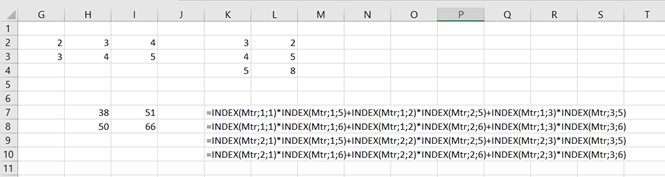
In the picture above the range G2:L4 is named after Mtr.
 My Problem Solving Blog