This is an extension for my earlier OFFSET blog “Introducing OFFSET function”.
One application for OFFSET is selecting a value from a two dimensional report.
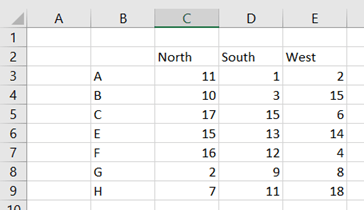
On the horizontal axis we have sales areas and products on vertical axis.
The issue is to enter sales area and product, and then receive the correct sales value.
First we need to use MATCH function.
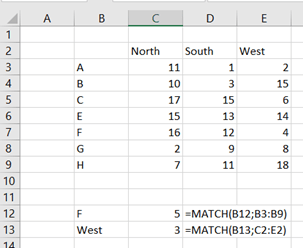
We have list of products in B3:B9. When we want to know what is the ordinal number of the given value. If we enter “F”, is it first, second, third or some other value in the B3:B9 ? The correct value is 5, as the “F” is 5th letter in the range.
The same applies to the horizontal axis. “West” is the third value in the range C2:E2.
Like this.
Now, we can use OFFSET-function. We know, that F is 5th and West 3rd on axises.
In OFFSET-function, we need to first define the starting cell or reference, that is B2. Then we set how many steps we take vertically, that is five steps downwards, as we are looking for “F”. After that we decide step horizontally. We step three steps to right. As we are not expecting a range but a singe cell as the return value, height and width arguments are both 1.
The formula is =OFFSET(B2;C12;C13;1;1) .
If you want to write the whole formula without interim values the formula goes like this:



 My Problem Solving Blog